Instagram Account Monitor
The Instagram Account Monitor helps you keep track of up to 10 Instagram accounts at once. It provides a clear overview of account status, scam risk, and whether an account has been banned.
Written By Outseeker
Last updated 10 months ago
🔎 Step 1: Access the Account Monitor
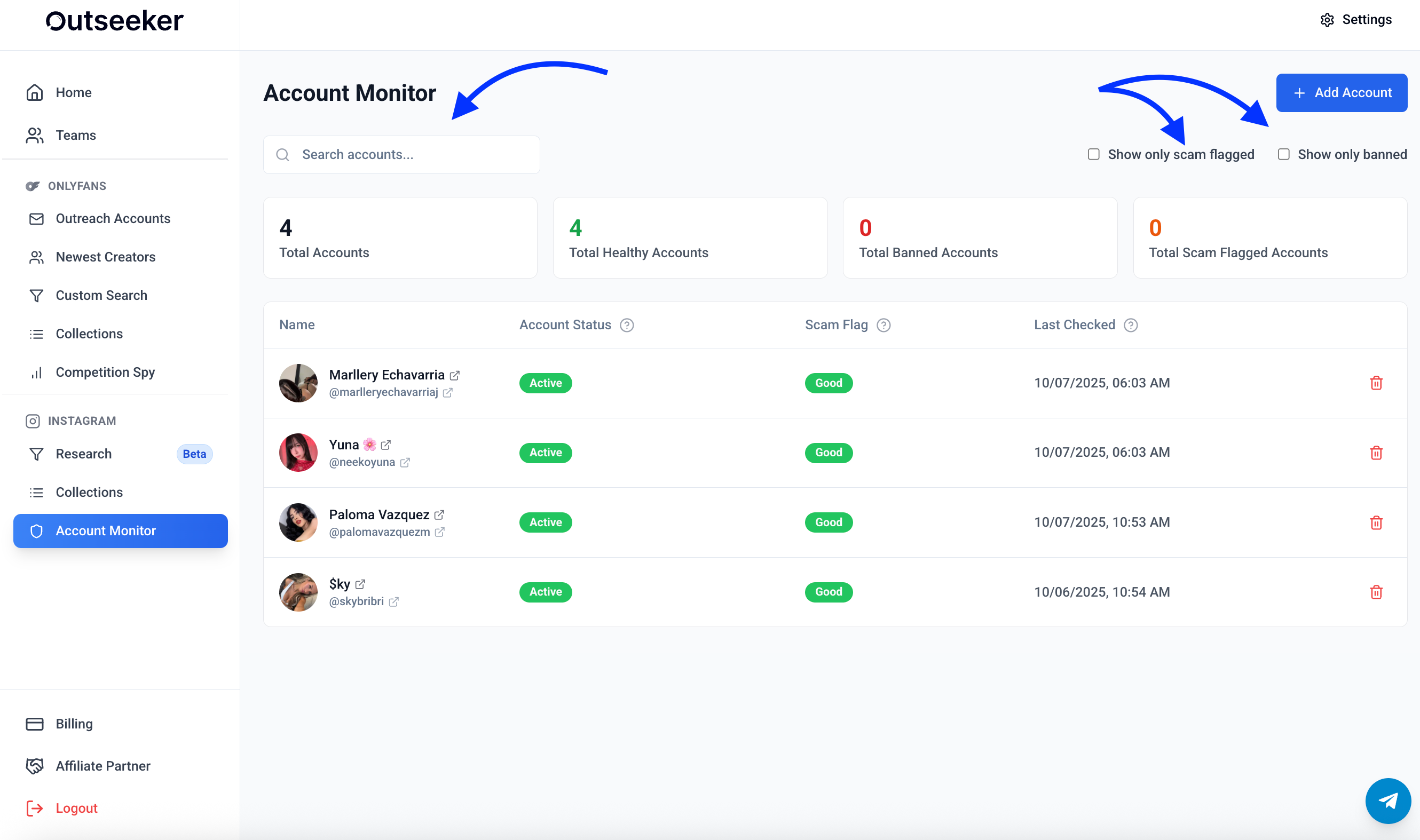
In the left sidebar, click Account Monitor.
Use the search bar at the top to quickly find accounts you’ve added.
Click + Add Account to monitor a new Instagram profile.
📊 Step 2: Review Account Overview
The dashboard shows:
Total Accounts – number of accounts you’re monitoring
Healthy Accounts – accounts that are active and safe
Banned Accounts – accounts that have been suspended by Instagram
Scam-Flagged Accounts – accounts marked as potentially unsafe
📋 Step 3: Check Individual Account Status
For each account, you can see:
Account Status → Active or Banned
Scam Flag → Good, Suspicious, or Flagged
Last Checked → the latest verification timestamp
Actions → remove accounts you no longer want to track
🧭 Step 4: Use Filters
Toggle Show only scam flagged to focus on risky accounts
Toggle Show only banned to view only suspended profiles
❓ Need Help?
If you have questions about monitoring accounts or scam flag results, visit the Support Center or contact us directly from the bottom-right corner of your dashboard.